Lincoln Park Financial
Bookmap futures broker service at Lincoln Park Financial connects the Bookmap heatmap to your futures account through Rithmic, so you can watch the order book and trade from one screen.
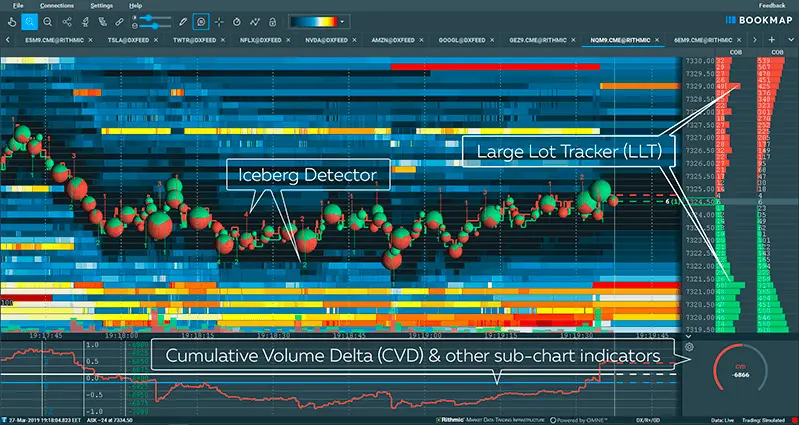
Bookmap is a trading platform that draws the order book as a heatmap over time. Resting bids and offers show as bands of color, executed trades show as volume bubbles, and indicators such as cumulative volume delta sit below the chart. You see where size was added, pulled or traded through, instead of only the last price.
For futures, Bookmap lists Rithmic as a recommended data connection, with full depth and CME Group Market by Order data. Bookmap also offers dxFeed and its own BookmapData feed as data options. Your account, margin and support are with Lincoln Park Financial, and Bookmap lists us on its partner page.
Rithmic (our main Bookmap connection). We enable a Rithmic User ID with Market by Order data for your account. Bookmap uses Rithmic for full depth data on most futures markets and Market by Order data on CME Group futures, and your orders route through Rithmic to the exchange. Rithmic fees are on our Rithmic pricing and fees page, and the Rithmic page covers R | Trader Pro and Plugin Mode.
Data only feeds. BookmapData and dxFeed are bought from Bookmap and supply data, not a brokerage account. Bookmap states that BookmapData needs a Global or Global+ package.
Chart trading. To send orders from the Bookmap chart to your funded account, Bookmap requires the Global+ package. Source: Bookmap connectivity guide, checked October 2026.
Running R | Trader Pro too? Start R | Trader Pro first, click Allow Plugins, then tick Plugin mode in the Bookmap Rithmic connection and enter the same credentials in both. This lets one Rithmic login feed both applications.
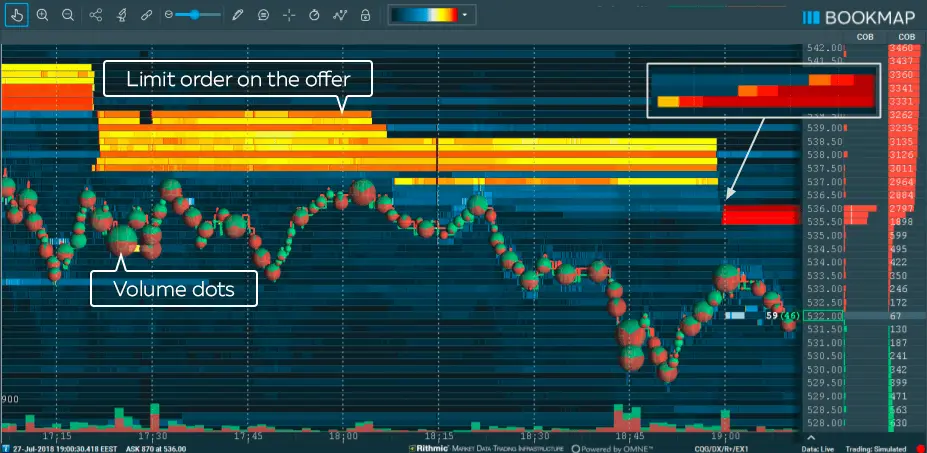
Watch resting buy and sell orders in real time on the Bookmap liquidity heatmap.
See price levels where visible order book depth is building or thinning.
Notice when large resting orders are added or pulled from the book.
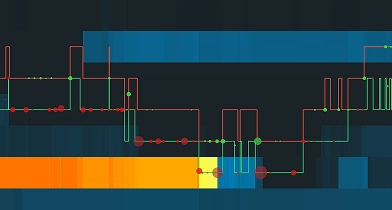
Track how incoming market orders meet the bid and the offer in real time.
Spot absorption and exhaustion as buying and selling pressure develops.
Read short term activity that a candlestick chart does not show.
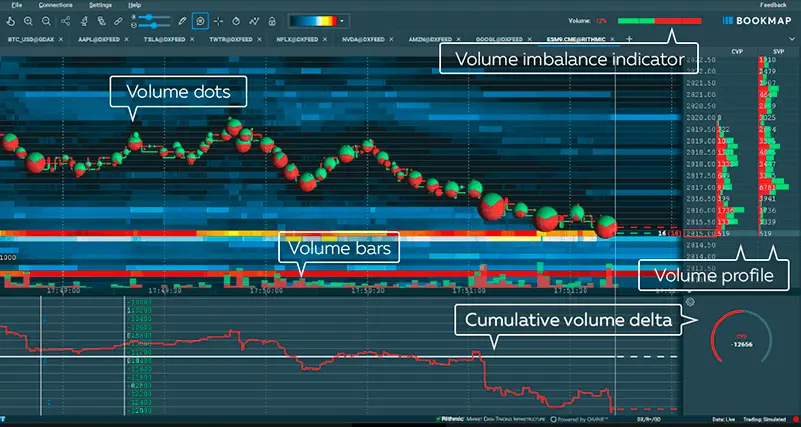
View executed trades as volume bubbles sized by the traded quantity.
Spot large prints as they happen.
Compare buying and selling activity at important price levels.

Billed monthly: $19 per month
Billed yearly: $16 per month
Lifetime license: not offered
Billed monthly: $99 per month
Billed yearly: $79 per month
Lifetime license: $1,990
Compare Bookmap packages on bookmap.com
Prices are listed by Bookmap and were checked in October 2026. Digital and Digital+ cover crypto in real time with delayed stocks and futures. For live futures data you need Global, and for trading from the chart you need Global+. Real time futures data fees are not included in the Bookmap price. Rithmic connection fees, exchange fees and commissions are separate; see Rithmic market data pricing or request a commission quote.
Other platforms we support: Sierra Chart for Teton routing and custom studies, CQG, R | Trader Pro and the full platform list. Check day trading requirements on our futures margins page, or open an account.
Yes. You can open a futures account with us and run Bookmap on it through a Rithmic connection. Bookmap is the software you trade on, your account and margin are held with Lincoln Park Financial, and Bookmap lists us on its partner page.
Bookmap Global connects real time futures data from providers such as Rithmic. To place orders from the Bookmap chart into a funded account, Bookmap requires Global+.
In Bookmap, open Connection, then Configure, click Add Connection and choose Rithmic. Enter the Rithmic username and password we send you and pick the System and Gateway we give you, then subscribe to a symbol from the Connection menu.
Bookmap needs Market by Order data, also called level 2 data, enabled on your Rithmic account. Call us and we will check the permission on your User ID.
Yes, with Plugin Mode. Start R | Trader Pro, click Allow Plugins, then tick Plugin mode in the Bookmap Rithmic connection and use the same credentials in both programs.
Rithmic. We set up Bookmap on a Rithmic User ID with Market by Order data, and your orders route through Rithmic to the exchange. Bookmap at Lincoln Park Financial runs on Rithmic only.
Bookmap lists Digital as free, Digital+ at $19 per month, Global at $49 per month and Global+ at $99 per month. Yearly billing lowers Global to $39 and Global+ to $79 per month, and lifetime licenses are $990 and $1,990.
No. Bookmap states that real time futures data fees are not included in the software subscription. Your Rithmic connection, exchange data fees and commissions are billed separately.
Bookmap Digital is free. It shows one instrument at a time with real time crypto data and delayed stock and futures data, so it suits learning the heatmap before you pay for live futures data.
Bookmap lists futures backfill of up to 24 hours for all of its futures connections, so the heatmap fills in recent activity when you open a chart.
Day traders who read the order book, traders who pair Bookmap with another charting platform, and anyone who wants a broker to help with Rithmic permissions and Plugin Mode.