
What Does the Quote Speed Slider Do on the Ironbeam Platform?
Last updated November 17, 2026
Quote Speed controls how quickly quotes update on your Ironbeam platform screen. It does not affect order execution or fills. To change it, click the menu icon at the top left, click Settings, find Quote Speed on the General tab, drag the slider toward Slower or Faster, and click SAVE.
The Quote Speed slider on the Ironbeam platform controls how quickly quotes update on your screen. It changes only the display of market data. It has no effect on order execution or fills, so your orders are handled the same way at every setting.
Where is the Quote Speed slider?
Quote Speed is in Settings, on the General tab.
- Click the menu icon. Click the menu icon at the top left of the platform.
- Click Settings. In the menu, click Settings, which is listed under User.
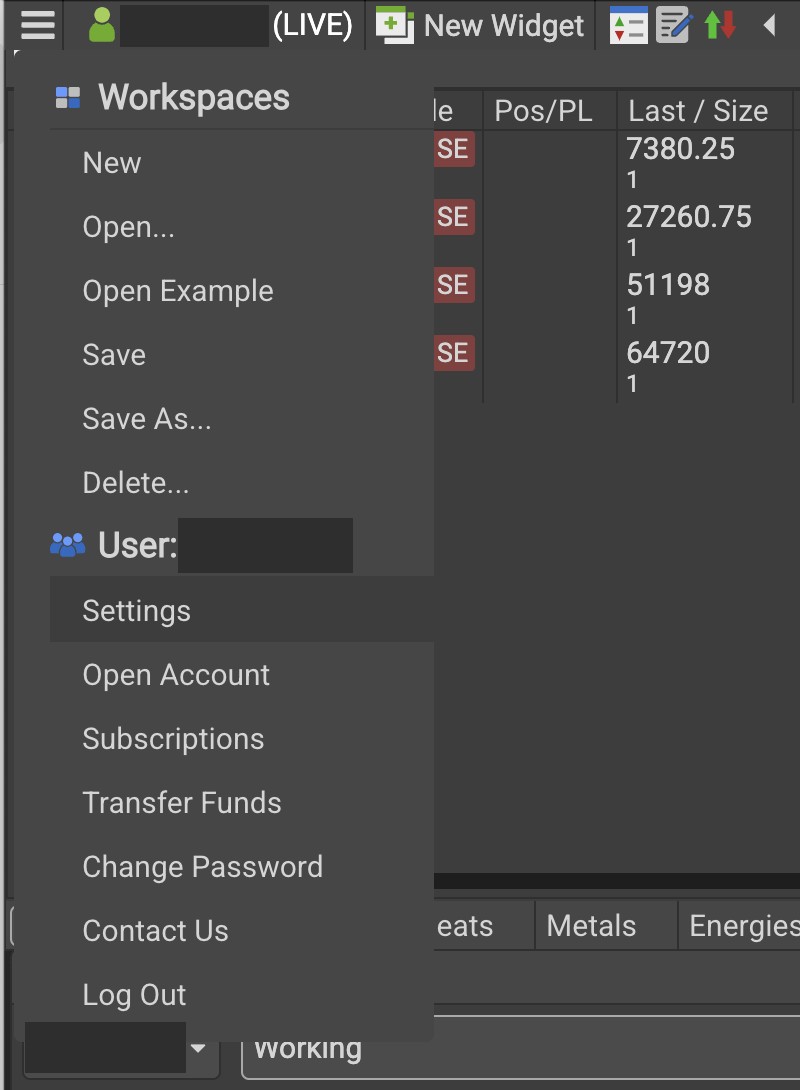
Click the menu icon at the top left, then click Settings. Screenshot of the Ironbeam platform. Account number hidden. - Find Quote Speed. On the General tab of the Settings window, find Quote Speed.
- Drag the slider. Drag the slider toward Slower or Faster.
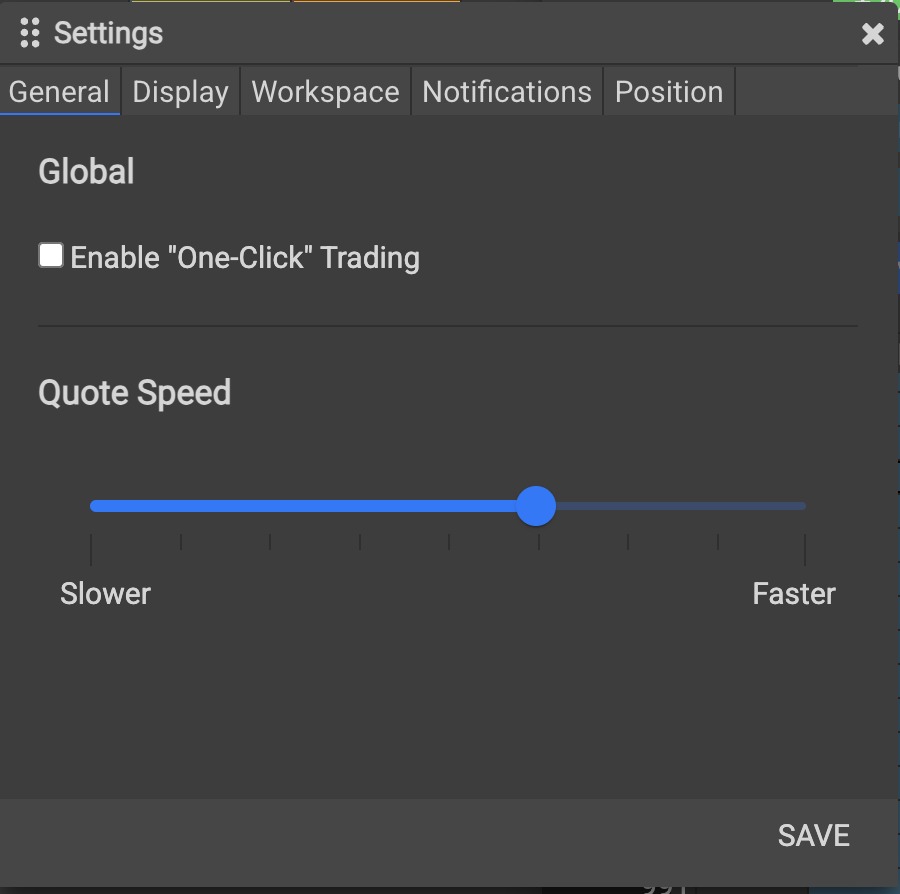
On the General tab, drag the Quote Speed slider toward Slower or Faster, then click SAVE. Screenshot of the Ironbeam platform. - Click SAVE. Click SAVE at the bottom of the Settings window to apply the change.
What does Quote Speed change?
- Display only: the slider sets how fast quotes are displayed and refreshed on your screen.
- No effect on execution: Quote Speed does not change how your orders are routed, executed, or filled.
Ironbeam explains that with Quote Speed set to the highest setting, the market data is unfiltered and trades arrive with ultra low latency. If you are unsure which setting to use, contact Lincoln Park Financial customer service.
For an overview of the other widgets and settings, see the Ironbeam Platform Walkthrough.
Frequently asked questions
Where is the Quote Speed slider on the Ironbeam platform?
Click the menu icon at the top left, click Settings, and find Quote Speed on the General tab.
Does Quote Speed affect order execution?
No. Quote Speed changes only how quickly quotes are displayed on your screen. It has no effect on order execution or fills.
What does the fastest Quote Speed setting do?
Ironbeam states that at the highest setting the market data is unfiltered and trades come in with ultra low latency.
Who can I contact if I need help?
Lincoln Park Financial customer service is available 24/7. Email customerservice@lpfutures.com or call 312 500 4730.
Need help with Quote Speed?
Lincoln Park Financial customer service is available 24/7 to help you set up the Ironbeam platform.
Contact us Call 312 500 4730Sources (checked November 17, 2026)
- Ironbeam platform screenshots taken by Lincoln Park Financial, November 18, 2026
- Ironbeam App: Platform Tour
Trading futures involves substantial risk of loss and is not suitable for all investors. Past performance is not indicative of future results.